


VPlay: All in One Video Player
3.6115.00 Reviews
App Specs
- Version
- 2.58
- Updated On
- License
- Free
- Downloads
- 5,000,000+
- Developer
- XEN Studios
- Categories
- Video Players & Editors
- Platform
- Android, iOS
Screenshots
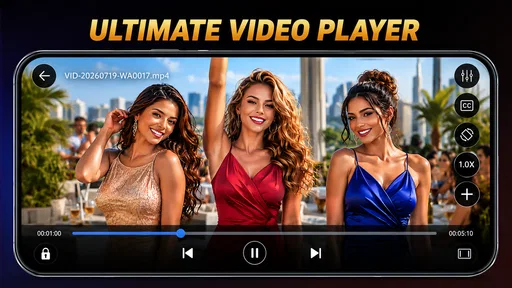

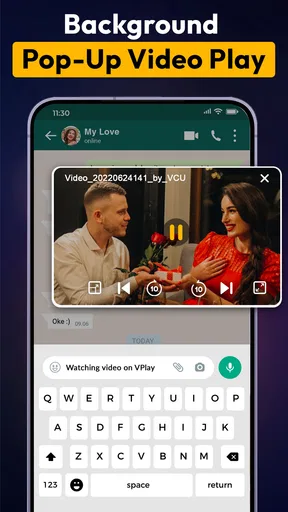
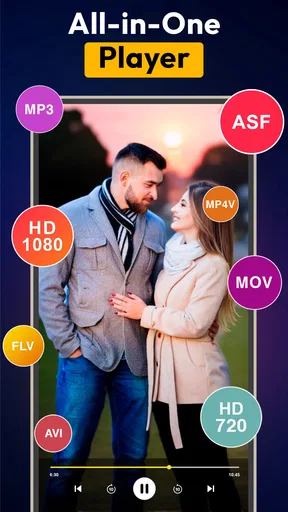
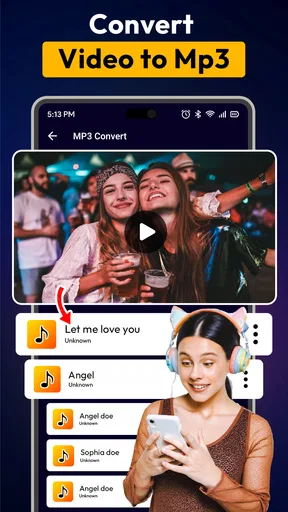

 Analysis by AppCompare
For someone who mainly wants a straightforward way to watch videos already saved on a phone, a player’s everyday usefulness matters more than a long list of promises. VPlay All in One XVideo Player is a free video player from XEN Studios, and its appeal is the idea of keeping video and music playback together in one app. I’d consider it when I want a separate player to try with a mixed collection of media, rather than assuming it will replace every streaming or library app I already use.
What the free option means
The app is free to download, with in-app purchases listed from $0.99 to $19.99 per item. That makes trying it a low-commitment decision, but it does not mean every part of the experience is free. I’d first use the no-cost version for the ordinary task I care about—opening a few of my own files—and only consider a purchase if I understand what it unlocks and know I need it. The listed range alone isn’t enough to judge whether any paid item is worthwhile.
That distinction is useful if you’re comparing it with a phone’s built-in media player. The built-in option may already handle your usual videos, so there’s little reason to spend money simply because another player has a longer feature list. VPlay is easier to justify if its combination of video and music playback fits a real routine, or if the player already on your device gives you trouble with files you want to watch.
Where the value is practical
For me, the strongest case for a dedicated player is having somewhere consistent to start when a file does not open as expected in the default app. A traveler, for instance, might have a few downloaded clips, a longer film, and music stored locally for a journey. A separate player can make that collection easier to approach than switching among unrelated apps, though I’d still test the specific files I rely on before a trip rather than assuming a format will work just because broad format support is advertised.
There’s also a modest workflow benefit to keeping playback tools in one place. If I’m moving between spoken content, music, and video, I can avoid treating each as a separate task. That is convenience, not a guarantee that the app will organize a large library better than a specialist music player or a polished streaming service. For someone who mostly watches online subscriptions, VPlay may add little; its value is more apparent when the files themselves are the focus.
Trade-offs before making it your regular player
A dedicated player is only helpful if it works well with the device and files in front of you. Playback can depend on the particular file and phone, so I’d try a short sample before relying on it for a long viewing session. If a file has unusual encoding, the sensible comparison is to try it in another player too. A broad compatibility claim should not be treated as a promise that every file will behave identically on every device.
It’s also worth being deliberate about paid extras. I wouldn’t buy an item simply to explore the app, especially if the free playback already covers my needs. If a feature is important, I’d check its description and price in the app before deciding. That keeps the cost decision tied to an actual benefit instead of the assumption that an in-app purchase automatically improves the core player.
Worth Reading Before You Choose

EA SPORTS FC Mobile 26 Is a Bigger Football Game, but It Takes Time

Flipboard Shows What News Apps Must Do Beyond the Feed

Switching to Android Auto Means Rethinking Your Driving Routine

Google Calendar Makes a Crowded Week Easier to Manage

Ludo King Makes the Most of the Minutes Between Plans

Baby Panda World Brings Quick Play to Modern Phones, but Its Game Library Feels Busy
Who is likely to get the most from it?
I’d suggest giving it a try if you keep personal videos or music on your phone and want a dedicated app to test against the default player. It may also suit someone who watches varied clips and values having playback controls and media tools gathered in one place. The app is rated for Everyone, which makes its stated age suitability broad, but adults should still use their own judgement about the content they choose to play or keep on a device.
I’d be less inclined to recommend it to someone whose viewing is almost entirely through subscription services, or to a person who wants advanced library management, extensive device syncing, or a tightly integrated streaming catalogue. Those are different needs from local playback, and a platform designed specifically for them may be a better fit. Likewise, if your phone’s standard player already handles your files and controls comfortably, installing another app may not improve your day.
VPlay All in One XVideo Player has an average rating of 3.7 from around 10,000 ratings, alongside 113 written reviews, and it has passed 5 million installs. I read those figures as a sign that it has found an audience, not as proof that it will suit every setup. Since it is free to start, my practical advice is to test the files and controls you actually use, then decide whether it earns a permanent place on your phone.
First Impressions Matter
From the moment I opened the app, I was struck by its sleek and intuitive design. You know that feeling when an app just gets it right? That’s exactly what happened with VPlay All in One XVideo Player. The interface is super user-friendly, almost like it knows what you want before you even tap. No clutter, just a clean, organized layout that makes navigation a breeze.
That first impression is most useful when I’m opening a video quickly rather than settling in to manage a carefully catalogued library. A clean starting point can reduce the little delays involved in finding a file, but it doesn’t settle the bigger question of whether the app fits a person’s collection. I’d judge the layout by trying the same everyday task I usually perform: locating a recent clip, opening it, and returning to my other media without losing track of where I was.
A Multimedia Marvel
But let’s talk about the real star of the show: the features. This app supports every video format you can think of, and I mean every format. From the usual suspects like MP4 and AVI to more niche formats, it's got you covered. I threw a bunch of different files at it, and it played each one flawlessly. No lag, no glitches—just smooth, seamless playback.
When file compatibility matters, I’d use a small test set rather than moving an entire collection at once. Try one familiar video, one file that has caused trouble in another player, and a short clip with subtitles if those matter to you. That gives a more useful answer than testing only a standard file that nearly every player can open. I’d also keep the original files untouched until I’m confident the app behaves as I expect.
The audio clarity is top-notch, too. Sometimes, apps tend to compromise on audio when focusing on video quality, but not this one. The sound was crisp, and I could hear every little detail, which made my binge-watching sessions even more enjoyable.
Sound quality is partly about the recording and the headphones or speakers I’m using, so I wouldn’t treat one listening session as a universal result. The practical test is whether dialogue, music, and quieter passages remain comfortable at the volume I normally choose. If I’m watching late at night or sharing a room, I’d check the audio controls before starting a long video, rather than discovering mid-session that the sound needs more adjustment than I want to make.
Features that Stand Out
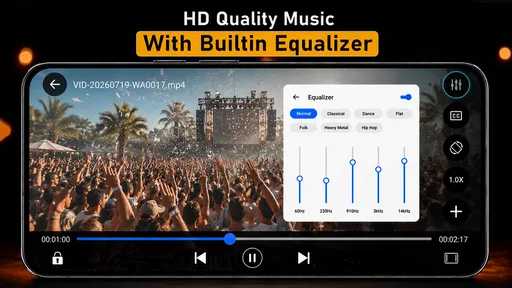
What really sets this app apart are the extra features. There’s a built-in equalizer that lets you customize sound settings to your liking. I found this super handy, especially when switching between different genres of music and movies. The subtitle support is another highlight. Adding and syncing subtitles was a breeze, which is a game-changer for foreign films.
The equalizer is most useful when I make a deliberate adjustment for a particular listening situation, then check whether it actually improves the sound. A setting that helps music may not suit dialogue, so I’d avoid assuming one custom profile is ideal for everything. For subtitles, I’d keep the video and subtitle file together when preparing a film, then check timing near the beginning. Catching a mismatch early is less frustrating than trying to correct it halfway through.
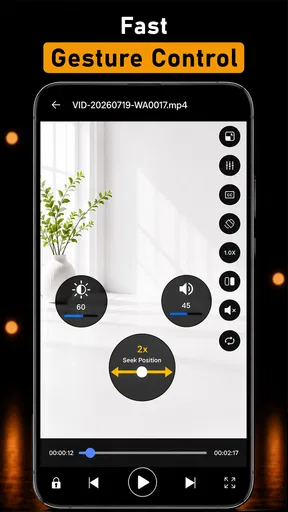
I also loved the gesture controls. Want to fast forward or adjust the volume? Just swipe, and you’re good to go. It’s these little things that make the viewing experience feel so effortless.
Gesture controls can be handy when I’m holding the phone one-handed, but they take a moment to learn and may be easy to trigger by accident. I’d test the swipe actions on a short clip before using them during a film. That’s a small trade-off: gestures can be quicker than reaching for buttons, while visible controls may be more predictable for someone who prefers precise taps.
Security and Privacy
Now, I know what you’re thinking. With all these features, what about security? The app ensures your privacy with a secure folder feature. You can keep your personal videos safe with a password, which gives you peace of mind in this digital age.
A password-protected folder can be useful for keeping personal videos separate from casual browsing, especially if I sometimes hand my phone to someone else. I’d still treat it as an organizational privacy feature, not a reason to store anything without thinking about device security overall. Before placing files there, I’d make sure I understand how to access them again and keep any important originals somewhere I can recover them if I change phones or apps.
Performance and Compatibility
One of the best things about VPlay All in One XVideo Player is how smoothly it runs. Even on older devices, the performance is commendable. No crashes, no freezes—just a seamless experience. It’s also compatible with both Android and iOS, so no one’s left out of the fun.
The Android release is version 2.39 and requires Android 7.0 or later. It was released on October 22, 2017, by XEN Studios, the developer behind the app. Before installing, I’d check the Android version on the device I plan to use; that simple check avoids wasting time on an incompatible phone. The listing’s platform information matters here too: a reader should confirm the app’s availability for their own device and store before planning around it.
For someone choosing between this and a more established all-purpose player, the deciding factor should be the exact workflow, not a vague claim that one is universally better. A standard phone player can be simpler and already integrated with the device. A streaming app is the natural choice for subscribed catalogues. A specialist media app may suit someone who wants deeper library tools. VPlay’s case is strongest when its combination of local video and music playback, subtitles, gestures, and sound adjustment matches what I actually do.
Why I Recommend It
In a world filled with countless apps, finding one that ticks all the boxes is rare. But this one does it with ease. Whether you're a movie buff, a music lover, or just someone who enjoys a great user experience, this app is definitely worth a download. It’s like having a mini-theater in your pocket.
I’d frame that recommendation as a low-risk trial rather than a promise that it will replace every media app. It is free to download, rated for Everyone, and includes in-app purchases ranging from $0.99 to $19.99 per item. Those purchases make it sensible to distinguish the basic tryout from any optional spending: I’d start with the free experience, check whether it handles my own files, and pay only if a specific extra clearly solves a problem for me.
So, if you’re looking for a top-notch video player that’s packed with features and delivers on performance, give this app a try. It's been a game-changer for me, and I’m pretty sure it’ll be the same for you.
Go ahead, download it, and let the binge-watching begin!
Pros
- Supports various video formats seamlessly.
- Smooth playback with minimal lag.
- User-friendly interface for easy navigation.
- Includes built-in subtitles support.
- Customizable playback settings.
Cons
- Ads can be intrusive during use.
- No offline download option available.
- Limited advanced features for video editing.
- Requires frequent updates for bug fixes.
- Some features locked behind paywall.
FAQs for VPlay: All in One Video Player
What video formats does VPlay All in One XVideo Player support?
VPlay All in One XVideo Player supports a wide range of video formats, including MP4, AVI, MKV, FLV, and more. Its versatile compatibility ensures that users can play virtually any video file without needing to convert formats, making it a convenient choice for diverse media collections.
Does VPlay All in One XVideo Player offer subtitle support?
Yes, VPlay All in One XVideo Player provides robust subtitle support. Users can load external subtitle files such as SRT, SUB, or IDX, and the app allows for customization of subtitle appearance, including font size and color, ensuring an optimal viewing experience for all users.
Is VPlay All in One XVideo Player free to use?
VPlay All in One XVideo Player is available as a free app with optional in-app purchases. While the free version includes core features, users can unlock additional functionalities and remove ads by upgrading to the premium version, offering a more enhanced experience.
Can I use VPlay All in One XVideo Player without an internet connection?
Yes, VPlay All in One XVideo Player can be used offline, allowing you to play downloaded videos without an internet connection. This feature makes it an excellent option for users who want to watch videos on the go or in areas with limited connectivity.
What unique features does VPlay All in One XVideo Player offer?
VPlay All in One XVideo Player includes unique features such as gesture controls for volume and brightness, a built-in equalizer for audio enhancement, and a playback speed adjustment tool. These features provide users with a customizable and interactive media playback experience.


